
- Compatible Versions
- 2.2, 2.3
- Additional Requirements
- PHP8.0+
- Visible Branding
- No
Introduction
All-in-one statistics add-on that transforms your forum's engagement data into a visually rich, interactive display. Whether placed as a widget on your forum list, embedded in a sidebar, or showcased on its own dedicated page, the statistics block gives your members a reason to explore, compete, and participate.
Features
Threads (8 tab types)
All-in-one statistics add-on that transforms your forum's engagement data into a visually rich, interactive display. Whether placed as a widget on your forum list, embedded in a sidebar, or showcased on its own dedicated page, the statistics block gives your members a reason to explore, compete, and participate.
Features
Threads (8 tab types)
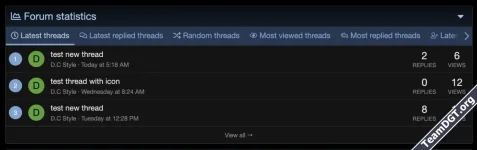
- Latest threads
- Latest replied threads
- Random threads
- Most viewed threads
- Most replied threads
- Unanswered threads
- Trending threads
- Most reacted threads
- Newest members
- Most interactive members
- Top contributors
- Latest resources
- Latest updated resources
- Most viewed resources
- Most downloaded resources
- Most liked resources
- Highest rated resources
- Top resource authors, sortable by 5 scopes: resource count, download count, reaction score, view count, and average rating
- Latest media
- Most viewed media
- Most commented media
- Most reacted media
- Highest rated media
- Random media
- Latest albums
- Most viewed albums
- Most commented albums
- Largest albums
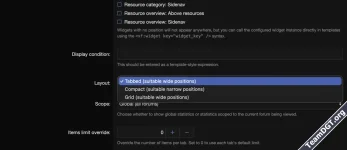
- Tabbed — Tabbed interface with lazy-loaded content. Ideal for above-the-fold placement on the forum list or a dedicated page.
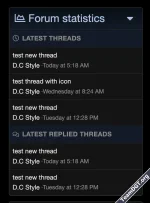
- Compact — Stacked, streamlined view designed for sidebar placement.
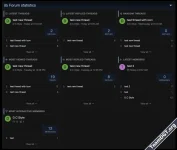
- Grid — CSS grid layout with a hero card, configurable columns (2-4 on desktop, 1-2 on tablet), and responsive breakpoints.
- Ships as a standard XenForo widget — place it anywhere the widget system allows.
- Includes a dedicated standalone page at /forum-stats/ with paginated "View All" for each tab.
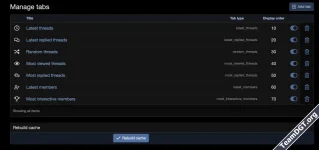
- Drag-and-drop tab ordering — reorder tabs visually from the admin panel.
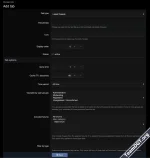
- Per-tab configuration — item limit, cache TTL, time period filter (all time / last 24h / 7 days / 30 days / etc.), forum or category scope, tag filtering, and user group visibility.
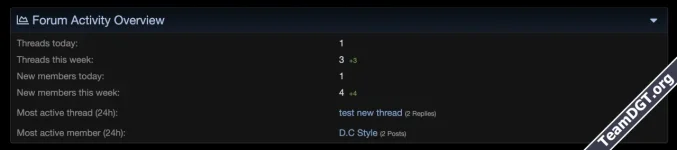
- Admin dashboard card — a quick-glance statistics card injected into the Admin CP home page showing live counts (threads and members today/this week, most active thread and member).
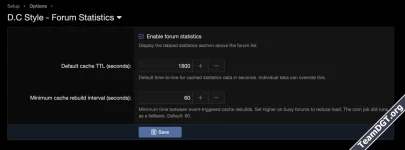
- Manual cache rebuild — one-click button to force-refresh all cached data.
- SimpleCache-based with per-tab configurable TTL.
- Event-driven cache invalidation — cache is rebuilt automatically when threads, users, resources, or media change, with built-in throttling to prevent stampedes.
- Cron rebuild every 30 minutes as a safety net.
- Lazy-loaded tabs — only the currently active tab loads data on initial render; switching tabs triggers an AJAX fetch.
- Global canView permission controls whether a user group can see the statistics block at all.
- Per-tab user group visibility lets you show different tabs to different audiences.
- Thread-based tabs respect XenForo's node-level viewing permissions — members never see threads from forums they cannot access.
- Unread badge tracking — new items since the user's last visit are highlighted via localStorage.
- AJAX load-more pagination — browse deeper into any tab without a full page reload.
- Responsive design — adapts to mobile, tablet, and desktop with dedicated breakpoints.
- No jQuery — built entirely with vanilla JavaScript, fully compatible with XenForo 2.3+.
- XenForo 2.2.0 or later
- PHP 8.0+
- (Optional) XenForo Resource Manager (XFRM) — for resource and resource author tabs
- (Optional) XenForo Media Gallery (XFMG) — for media and media album tabs
- Install the add-on — In the Admin CP, navigate to Add-ons > Install/upgrade from archive (or use Install from directory if you uploaded manually). Alternatively, install via CLI:
php cmd.php xf:addon-install DC/ForumStats - Place the widget — Go to Admin CP > Appearance > Widgets and add a new widget. Select [D.C Style] Forum Statistics as the widget definition, choose your preferred position (e.g., Forum list: Above content), and configure layout mode and grid options.
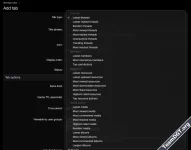
- Configure tabs — Navigate to Admin CP > D.C Style - Forum Statistics -> Manage tabs to manage your statistics tabs. Add, reorder, enable/disable, and configure each tab's settings — including item limits, cache duration, time period, content scope, and user group visibility.
- Set permissions — Under Admin CP > Users > User group permissions, grant the Can view forum statistics permission to the user groups that should see the block.