
- Compatible Versions
- 2.3
 What is [XenDev] View Statistics?
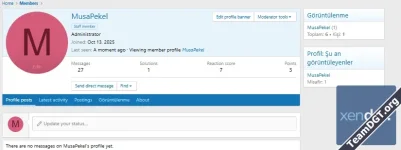
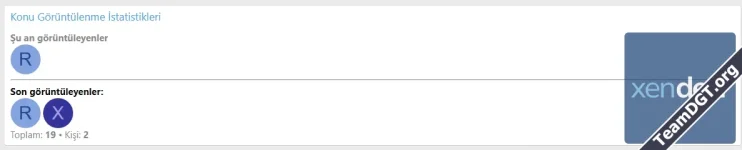
[XenDev] View Statistics is an advanced statistics add-on developed for XenForo 2.3 forums.It allows administrators and users to track profile, thread, and forum views, while also displaying useful data such as recent viewers, live viewers, and most viewed content.
In short, this add-on transforms a standard forum into a more dynamic, trackable, and engaging community platform.
 What Does This Add-on Do?
The main purpose of this add-on is to make forum activity more visible.Normally, when a user visits a profile, thread, or forum, that activity remains mostly invisible. With this add-on, those views are logged and presented in a meaningful way.
It can help answer questions like:
- How many times has a profile been viewed?
- Who recently visited this forum?
- How many users are currently reading this thread?
- Which threads are the most viewed?
- Which forums or members are the most popular?
 Core Features
1.  Profile View Tracking
Tracks how many times member profiles are viewed.- Displays total profile view counts
- Can show view data inside a dedicated profile tab
- Can list recent profile viewers
- Supports more meaningful view tracking with unique visit logic
2.  Thread View Statistics
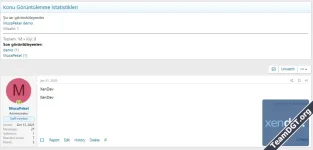
Makes thread activity more visible.- Supports total thread view data
- Can display recent viewers of a thread
- Can show users currently reading the thread
- Guest viewers can be counted separately
3.  Forum View Tracking
Measures how often forums and categories are visited.- Tracks forum-level views
- Can show recent forum viewers
- Can display currently active users inside a forum
- Supports live user badges in forum lists
4.  Live Viewers
One of the most impressive features of the add-on.It can show which users are currently viewing a specific piece of content within a defined time window.
Supported areas include:
- Profile pages
- Thread pages
- Forum pages
- List members separately
- Count guests separately
- Limit how many users are shown
5.  Recent Viewers
Shows the most recent users who viewed a profile, thread, or forum.This can be used in:
- Profiles
- Threads
- Forums
- Username only
- Avatar only
- Avatar + username
6.  Most Viewed Widgets
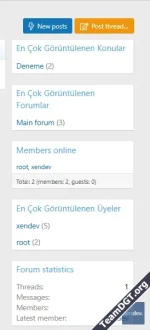
The add-on can display leaderboard-style widgets in supported widget positions, such as:- Most viewed threads
- Most viewed forums
- Most viewed members
 Available Settings
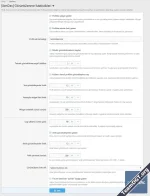
The add-on includes a wide range of practical options in the admin panel.Main settings may include:
| Setting | Description |
|---|---|
| Show profile widget | Enables or disables the profile statistics widget |
| Enable profile tab | Adds a dedicated statistics/view tab to member profiles |
| Profile tab title | Lets you customize the tab name |
| Track guests | Includes guest visitors in the logs |
| Count self views | Decides whether a user’s own visits are counted |
| Deduplication time | Prevents the same user from being counted repeatedly in a short period |
| Recent viewers limit | Sets how many users appear in recent viewer lists |
| Homepage widget item limit | Controls how many items are shown in leaderboard widgets |
| Widget cache duration | Defines how long widget data is cached |
| Log retention period | Sets how many days view logs are stored |
| Enable live viewers | Turns realtime viewer tracking on or off |
| Live viewers limit | Sets how many active viewers are displayed |
| Live window duration | Defines how long a user is considered “currently viewing” |
| Display style | Username only / avatar only / avatar + username |
| Forum list badge | Shows a live viewer badge in forum lists |
 Default Widget Positions
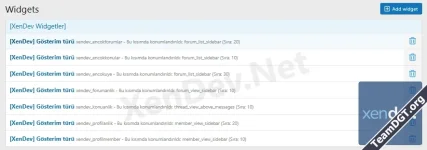
After installation, the add-on may provide ready-to-use widget placements such as:- Forum list sidebar
- Most viewed threads
- Most viewed forums
- Most viewed members
- Profile sidebar
- Profile view statistics
- Live profile viewers
- Forum view
- Forum statistics and live viewer widgets
- Thread view
- Thread statistics and live viewer widgets
 Usage Recommendations
To get the best performance and usefulness from the add-on, the following recommendations may help:- Keep live viewers enabled
- Use a recent viewers limit between 5 and 12
- Leave widget cache around 300 seconds
- Increase deduplication time
- Use the live window more carefully
- Increase cache duration to reduce system load
- Set a sensible log retention period to control database growth
This add-on is especially useful for:
- Active community forums
- Gaming and roleplay communities
- Support and help forums
- Social forums that want more visible engagement
- Administrators who want to measure real content interest